Installation and usage
YandexGamesSDK is a plugin for the Construct 3 engine providing convenient access to the Yandex Games API.
Integration of the SDK is mandatory for successful moderation.
The plugin provides the following capabilities:
- Visual blocks for full interaction with Yandex Games API
- Use of Yandex Games SDK in JavaScript blocks
- Flexible localization of text and assets
- Additional utilities for easier development
Installation
-
Download the latest version of the plugin from GitHub.
-
Open Construct 3.
-
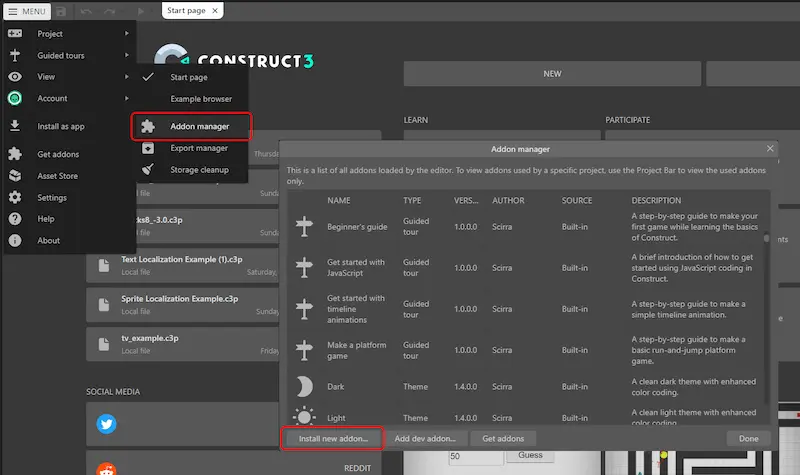
Go to Menu → View → Add-ons Manager.
-
In the window that appears, click Install new add-on and select the downloaded
.c3addonfile.
Adding to project
To start using the Yandex Games plugin:
-
Right-click on the layout and select Insert new object.
-
In the menu that appears, scroll down to the Platforms and APIs section, select the YandexGamesSDK plugin and click Insert.

After that, the plugin will be added to your project, and you will be able to use the Yandex Games SDK.
Was the article helpful?
Previous
Next