---
metadata:
- name: generator
content: Diplodoc Platform v5.66.0
alternate:
- https://yandex.ru/dev/dialogs/smart-home/doc/en/monitoring.md
- https://yandex.ru/dev/dialogs/smart-home/doc/ru/monitoring.md
- href: https://yandex.ru/dev/dialogs/smart-home/doc/en/monitoring.md
type: text/markdown
title: Markdown version
- href: https://yandex.ru/dev/dialogs/smart-home/doc/en/llms.txt?revision=r21995741
rel: describedby
---
> **Documentation Index:** Fetch the complete configuration index at https://yandex.ru/dev/dialogs/smart-home/doc/en/llms.txt?revision=r21995741
# Skill monitoring
Yandex Smart Home lets you analyze the performance of your skill by viewing request statistics and receiving error reports. This will help you to identify issues with processing requests from Yandex Smart Home in a timely manner.
## Statistics {#statistics}
Statistics are available for published skills only.
To view the statistics, open the [developer console](https://dialogs.yandex.ru/developer/), go to the skill page and open the **Monitoring** tab.
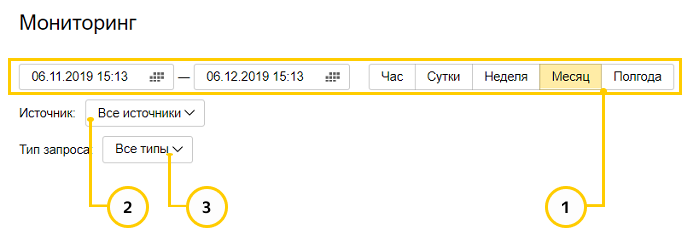
#### 1. Reporting period {#period}
Period of the report. The default reporting period is one day. You can set a date range that doesn't exceed six months.
#### 2. Source {#source}
Sources to include in the report. The source is an interface that's used for sending commands to the skill. List of available sources:
- [Alice](https://yandex.ru/alice).
- [Home with Alice](https://alice.yandex.ru/smart-home) app.
- [Testing mode](https://yandex.ru/dev/dialogs/smart-home/doc/en/testing.md) in the console.
You can customize the report, enabling or disabling each type of data under the graph. For example, you can show the desired percentile or only the `error_http_5xx` errors.
#### 3. Request type {#source-type}
Which requests to get statistics for:
- [Information about user devices.](https://yandex.ru/dev/dialogs/smart-home/doc/en/reference/get-devices.md)
- [Information about the states of user devices.](https://yandex.ru/dev/dialogs/smart-home/doc/en/reference/post-devices-query.md)
- [Change device state.](https://yandex.ru/dev/dialogs/smart-home/doc/en/reference/post-action.md)
- [Notification of unlinked accounts.](https://yandex.ru/dev/dialogs/smart-home/doc/en/reference/unlink.md)
## Reports {#report}
The following reports are available:
- [HTTP requests to Endpoint URL](#rps)
- [Device access errors](#err-get-devices)
- [Device list update errors](#err-query)
- [Timings](#time-limit)
#### HTTP requests to Endpoint URL {#rps}
The first graph shows the number of requests sent from Yandex Smart Home to the skill, that is, the average number of requests sent per second over the course of a minute. For example, the graph below shows an average of 0.15 requests per second on November 12 at 21:18 (the average value for this minute).

The second graph shows the total number of errors for the specified time interval (per day in the graph below).

#### Device access errors {#err-get-devices}
The first graph shows the average number of failed [device](https://yandex.ru/dev/dialogs/smart-home/doc/en/concepts/device-types.md) access attempts (per second). You can find the error codes in [Response codes](https://yandex.ru/dev/dialogs/smart-home/doc/en/concepts/response-codes.md).

The second graph also shows the average number of device access errors, but grouped by time intervals.

#### Device list update errors {#err-query}
The report shows the number of errors that occurred when the list of devices was being updated. Such errors may occur due to incorrect device descriptions (`validation_error`) and invalid skill responses to Yandex Smart Home requests (`bad_response`). For more information about the response format, see the [Yandex Smart Home operating protocol](https://yandex.ru/dev/dialogs/smart-home/doc/en/reference/resources.md).

#### Timings {#time-limit}
The graph shows the time period covered by the selected request percentile. The request time is measured from the moment the request is sent by smart home platform till the moment a response is received from the skill. For example, if the 75 percentile for the unlink accounts request (`unlink_75`) is 3 seconds, it means that 75% of such requests were made within 3 seconds.

{% note alert %}
The skill response waiting time is 3 seconds. If Yandex Smart Home gets no response within this time, Alice alerts the user that devices aren't responding for a long time. If you manage devices in **Smart Home** → **Devices**, the user will see an error message and the request ID.
This 3-second interval includes:
- Setting up a network connection.
- The time needed to deliver the request to the skill's server.
- The time needed to execute the skill.
- The time needed to deliver the response to Alice's servers.
{% endnote %}
{% note alert %}
The response length must not exceed 5000 characters, the length of the OAuth token or refresh token must not exceed 2048 characters. Token lifetime (the `expires_in` property) must be an integer between 1 and 4,294,967,296.
{% endnote %}
## Useful videos {#useful-video}
{% cut "Publishing and promoting skills (from 22:06)" %}
{% endcut %}
{% cut "Developing a voice app prototype (from 1:11:47)" %}
{% endcut %}