How to set up reminders
You can send yourself a reminder about a Yandex Tracker issue.
Creating a reminder
To set up reminder:
-
Open the issue page.
-
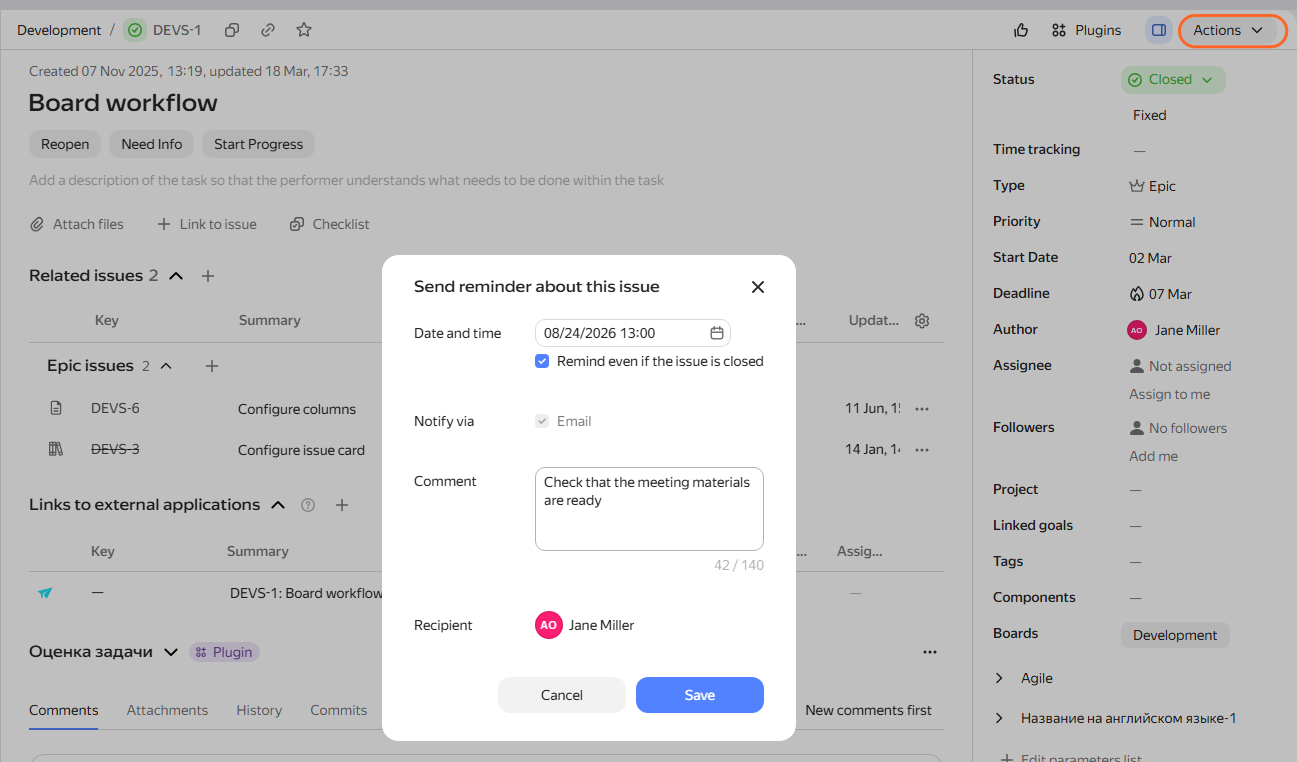
In the upper-right corner, select Actions → Add reminder.
-
Specify the date and time of the reminder.
-
To send an issue reminder regardless of the issue status, select Remind even if issue closed.
-
Enter the comment. You will see it in the reminder message.
-
Click Save. On the issue page, you'll see the icon with the reminder count.
When the time you specified arrives, Tracker will send you a message, and a reminder pop-up will appear on the issue page.
Editing a reminder
To edit an issue reminder:
-
Go to the issue and click .
-
Select the reminder from the list.
-
To the right of it, click .
-
Edit the reminder and click Save.
Deleting a reminder
To delete an issue reminder:
-
Go to the issue and click .
-
Select the reminder from the list.
-
To the right, click .
Create an event in the calendar
From the issue page, you can create an event in Yandex Calendar; for more details, see Creating a Yandex Calendar event.