Asynchronous multiplayer
The Construct 3 plugin supports asynchronous multiplayer. For more details, see the HTML5 section.
Multiplayer initialization
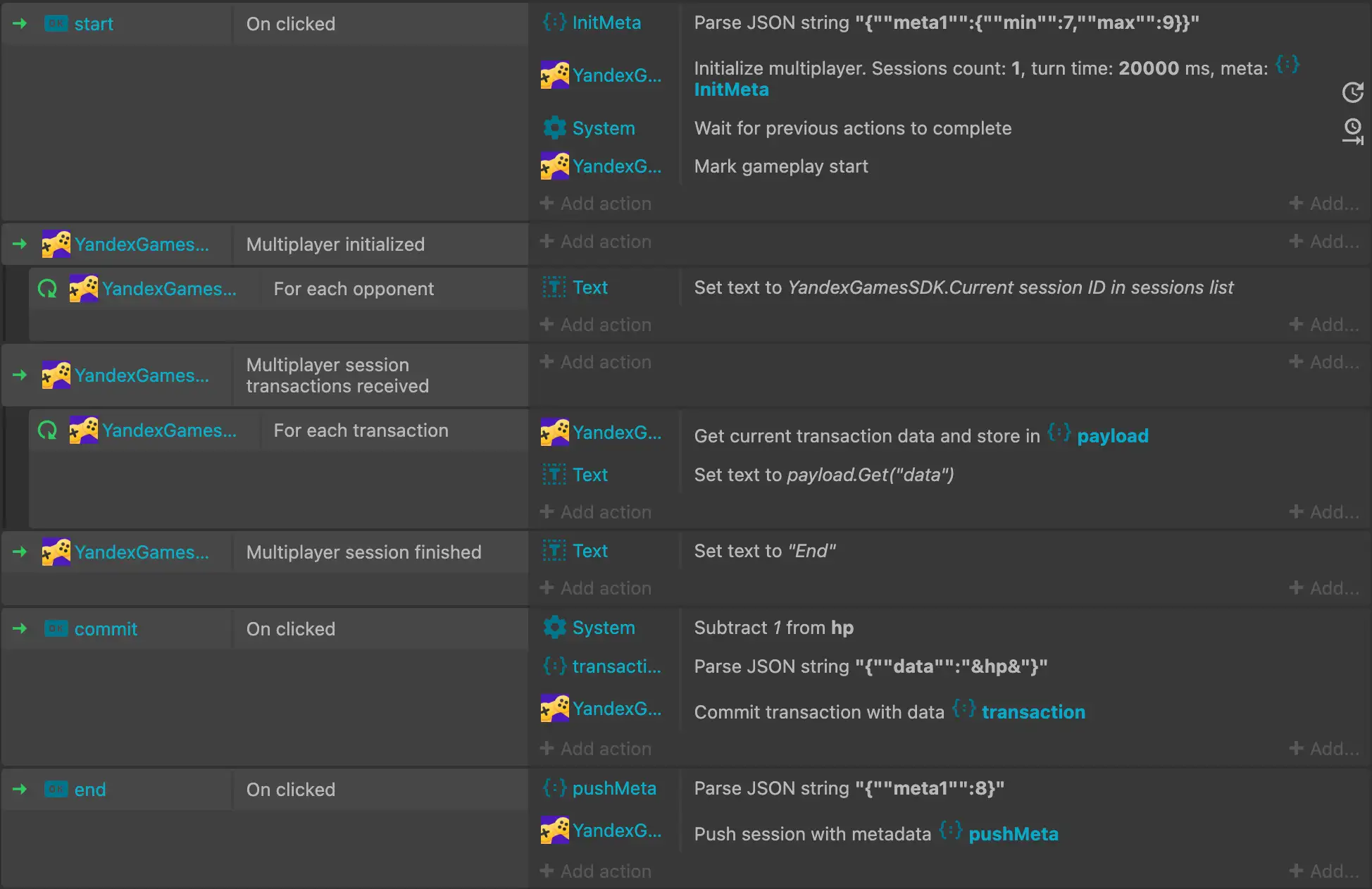
To get started, use the Initialize multiplayer action. It performs initial initialization and loads game sessions of opponents.
Initialization parameters:
|
Parameter |
Type |
Description |
|
Sessions count |
|
Number of sessions to load (maximum 10). |
|
Turn time |
|
Maximum opponent turn time in milliseconds. |
|
Meta |
|
Object with data for session selection. |
For more details about parameters, see the main article.
After successful multiplayer initialization, the On multiplayer initialization trigger will be activated. To process the received opponent sessions, use the For each opponent loop inside it. The following expressions are available in the loop:
- Current session player data — player data in the current session by the
avatarornamekey. - Current session ID in sessions list.
To get session metadata, use the Get current session metadata action.
Recording a game session
Available actions:
-
Commit transaction — use to commit transactions. The action accepts a JSON object with data.
-
Push session — use to save the session. The action accepts a JSON object with session metadata.
For more details, see the main article.
Working with sessions
In Construct 3, working with sessions is done only through events. For this, the On multiplayer session transactions and On multiplayer session finish triggers are used.
In the On multiplayer session transactions trigger, the following are available:
-
The Session ID in event expression.
-
The For each transaction loop — for processing the list of incoming opponent transactions. The following expressions are available in the loop:
- Current transaction ID in transactions list.
- Current transaction time in transactions list.
To get transaction data, use the Get current transaction data action.
In the On multiplayer session finish trigger, the Session ID in finish event expression is available.
To initiate sending sessions to handlers, call the Mark gameplay start action. Pausing is done by calling Mark gameplay stop.
For more details about working with sessions, see the main article.
Usage example